Upcoming Appointments Tab
The Upcoming Appointments tab is used to review information about upcoming service appointments associated with XtreamService leads.

|
To access the Upcoming Appointments tab, click the |
 (Upcoming Appointments) icon on the
 Note - The number of days that display on the Upcoming Appointments tab is determined by the number of days entered in the Day field in the Schedule Settings panel on the General Settings screen. In addition, if On the Day Of is entered in the Day field, the Upcoming Appointments tab does not display.
This tab can be viewed in either the List view or the Detailed view.
 List View
The List view of the Upcoming Appointments tab is used to view the total number of upcoming service appointments associated with XtreamService leads for up to three business days. To access the List view, click the  (List View) icon.
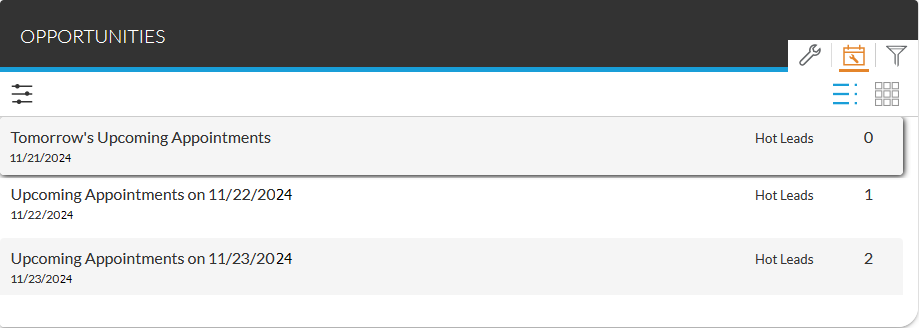
Additionally, to view details about individual service appointments associated with XtreamService leads for a specific day, click a row to display the Upcoming Appointments Details panel.
The following fields display on the Upcoming Appointments tab in the List view.
Date: (Not labeled) The date on which the appointments are scheduled displays.
Hot Leads: The total number of appointments associated with XtreamService leads displays.
Detailed View
The Detailed view of the Upcoming Appointments tab is used to view the number of upcoming service appointments associated with XtreamService leads for different types of customers for up to three business days. To access the Detailed view, click the  (Detailed View) icon.
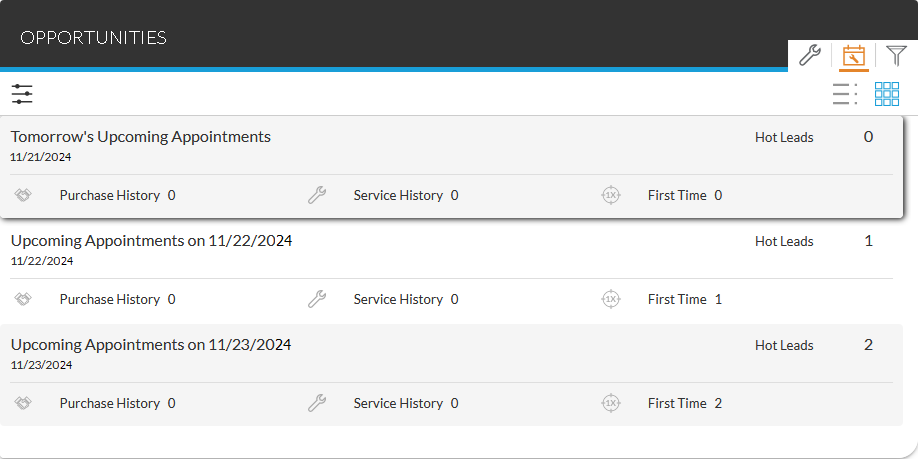
Additionally, to view details about individual service appointments associated with XtreamService leads for a specific day, click a row to display the Upcoming Appointments Details panel.
The following fields display on the Upcoming Appointments tab in the Detailed view.
Date: (Not labeled) The date on which the appointments are scheduled displays.
Hot Leads: The total number of appointments associated with XtreamService leads displays.
Purchase History: The number of appointments for customers who have purchased vehicles from the dealership displays.
Service History: The number of appointments for customers who have brought their vehicles in for service but have not purchased vehicles from the dealership displays.
First Time: The number of appointments for customers who have neither purchased vehicles from the dealership nor brought their vehicles in for service displays.
Click here for a list of products that may be mentioned in this help file.